1.2. Transport and installation
1.2.1. Transport and shipping
The X-KEY Terminator machine is factory-packed in a cardboard box with appropriate fillings to protect it from external factors such as shocks and impacts. However, due to the precise design of the device and the weight of some components, the machine is particularly susceptible to overloads resulting from inertial forces.
The recommended method of transport is to transport the machine on a pallet. Individual transport is also permitted, for example in the trunk of a passenger car.
Keep the packaging for safe transport in the future. The machine is secured for transport with two locking screws Z1 and Z2, which must be removed before starting work.
Warning
It is not permitted to send the machine as a standard package via shipping services. Shipping companies allow for the possibility of the package falling from a height in such cases, which may result in permanent damage to the device.
1.2.2. Unpacking and moving the device
When unpacking the device, ensure that there is sufficient space for all components from the packaging.
First, remove all accessories from the packaging and only at the finish, due to its weight, remove the machine itself. Removing the styrofoam filling between the accessories and the machine from the box will facilitate proper handling of the device.
The machine should be moved by holding the base or, if necessary, the outer casing.
Warning
When moving the machine, do not touch the scanning and milling unit components or the control panel components.
1.2.3. Removal of transport safety devices (screws Z1 and Z2)
Before removing the locking screws, ensure that there is sufficient space and prepare a 3 mm Allen key from the basic tool kit provided.
- Ensure that all cables are disconnected from the machine and that there are no objects behind the device. It is recommended to place a soft mat behind the machine.
- Carefully tilt the machine backward and gently place it on the prepared base.
- Unscrew and remove the screw marked with a red sticker Z2.
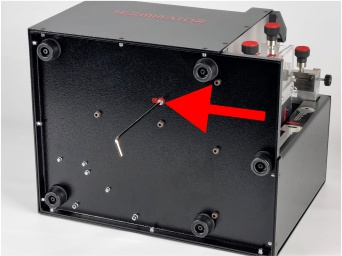
- Carefully set the machine back on its base.
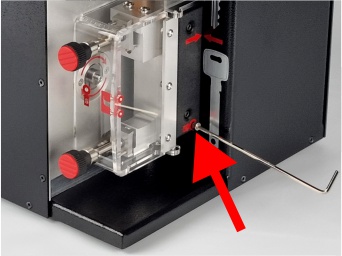
- Unscrew and remove the screw marked with a red sticker Z1.
- The removed screws Z1 and Z2 and the Allen key must be secured and stored in the tool box.
Warning
If the machine is transported again, screws Z1 and Z2 must be reinstalled.
Info
The installation of safety devices is carried out in the reverse order to their removal. Please note that screw Z1 is longer than screw Z2. Before screwing in screw Z1, manually set the milling unit to the transport position so that the tips of the red arrows on the machine housing and the milling unit are exactly aligned. In this position, screw Z1 should enter the hole freely, leaving approximately 1.5 cm of thread for tightening.
1.2.4. Working space for the machine
- The machine should be set up on a flat, stable, and level table.
- Ensure that there is sufficient free space around the machine:
- at least 10 cm on the left and at the back,
- at least 30 cm on the right side.
- It is unacceptable for any contaminants to enter the machine, in particular filings from other milling machines or devices.
- The operator must have easy access to the key components of the machine:
- front part of the machine – control panel,
- right side of the machine – scanning and milling units.
- It is recommended to place the machine in a clean, well-lit place, which facilitates operation and increases work safety.
- Avoid shocks and vibrations at the machine's installation site, as they may affect the machine's accuracy.
1.2.5. Power connection
Before connecting the power supply, the following conditions must be met:
- The electrical outlet where the machine is to be connected must be grounded, i.e., it must have an additional pin connected to the protective earth (PE) conductor.
- The machine is set up correctly and there is sufficient space for the operator.
- The machine's emergency stop switch is in the off position (pressed).
- The locking screws Z1 and Z2 are removed.
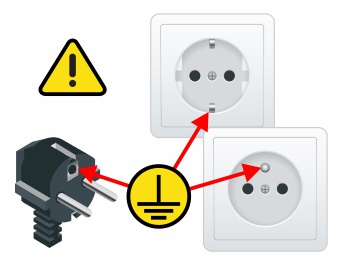
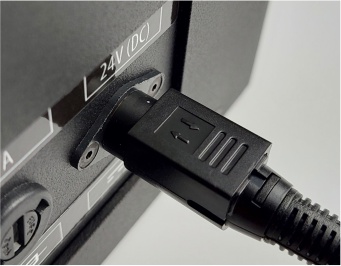
Once all conditions have been met, connect the power supply to the mains socket using the supplied cable. Then insert the power supply plug into the machine, ensuring that the flat side (with the arrow icon) is facing upwards.
Info
When disconnecting the power plug from the machine, pull the element with the arrow icons to unlock it. Do not pull on the cord, as this may damage the plug or socket.
1.2.6. First start-up
Once all the required conditions have been met, the machine is ready to start operation.
Warning
To ensure safe and trouble-free use, please read the entire manual before starting the machine for the first time.
Info
When the new device is turned on for the first time, a language selection menu and basic information on how to start work will appear on the screen.