1.3. Control panel
1.3.1. Description of components
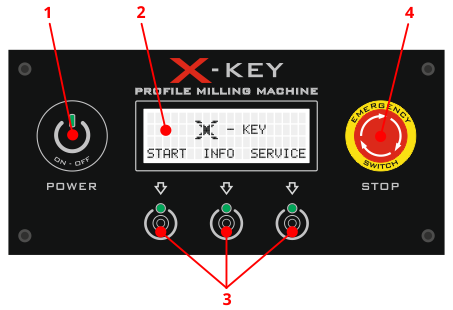
- Touch power switch
- Display
- Touch buttons for control
- Emergency stop switch
1.3.2. Switching on the power supply
To start the machine, follow the sequence of steps below:
- Unlock the emergency switch – if the machine has been completely shut down, turn the emergency switch on the control panel to the right (clockwise) by approximately 45º until it pops out slightly and is thus activated.
- Activate the machine power – press and hold the touch power switch (for about 1 second) until you hear a short beep. The machine will start up and enter standby mode, displaying the available operations on the panel.
The indicator light above the power switch touch panel indicates the machine status and response to touch:
- color red – machine off (standby mode),
- color green – machine is on,
- color blue – touch detection.
1.3.3. Display and control buttons
The LCD display shows the current operating status of the machine, messages, and instructions. The bottom line of the screen shows the available operating options, which are selected by pressing the corresponding touch fields below the display – hereinafter referred to as control buttons.
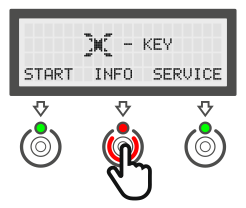
Each time the control button is pressed, it is signaled by:
- change the color of the indicator light above the button to red
- short beep.
The assigned action is performed when the control button is released, not when it is pressed.
1.3.4. Switching off the machine
After finishing work, the machine must be turned off using the touch power switch. As with starting, it is necessary to hold the touch field for a longer period (approx. 1.5 seconds) until the display and machine lighting go out.
Tip
Before turning off the power, it is recommended to return to the main menu (welcome screen) to ensure that all processes have been completed properly and that the machine axes return to their initial (safe) position.
Warning
The emergency stop switch is not a control device intended for regular shutdown of the machine. Use it only in emergency situations.
1.3.5. Emergency stop switch
The emergency stop switch is a component of the control system responsible for immediately stopping the machine in emergency situations. It should only be used in emergency situations, such as:
- direct threat to the health or life of the operator,
- uncontrolled movement of the machine,
- risk of damage to mechanical or electrical components.
Improper use of the emergency stop switch may result in:
- accelerated mechanical wear (limited number of cycles),
- reduced effectiveness in emergency situations,
- loss of compliance with safety system requirements.